> ## Documentation Index
> Fetch the complete documentation index at: https://docs.theauth.dev/llms.txt
> Use this file to discover all available pages before exploring further.
# MCP OAuth 2.1
> Configure theAuth as an OAuth 2.1 authorization server for the Model Context Protocol. Implements PKCE S256, RFC 9728, RFC 8414, RFC 8707, and RFC 7591.
Building in Go? See the [theAuth Go library docs](/go/getting-started/overview).
## What MCP auth is
The Model Context Protocol defines how AI clients connect to tool servers. The 2025-03 revision added an auth layer: MCP servers can now require OAuth 2.1 tokens before accepting tool calls.
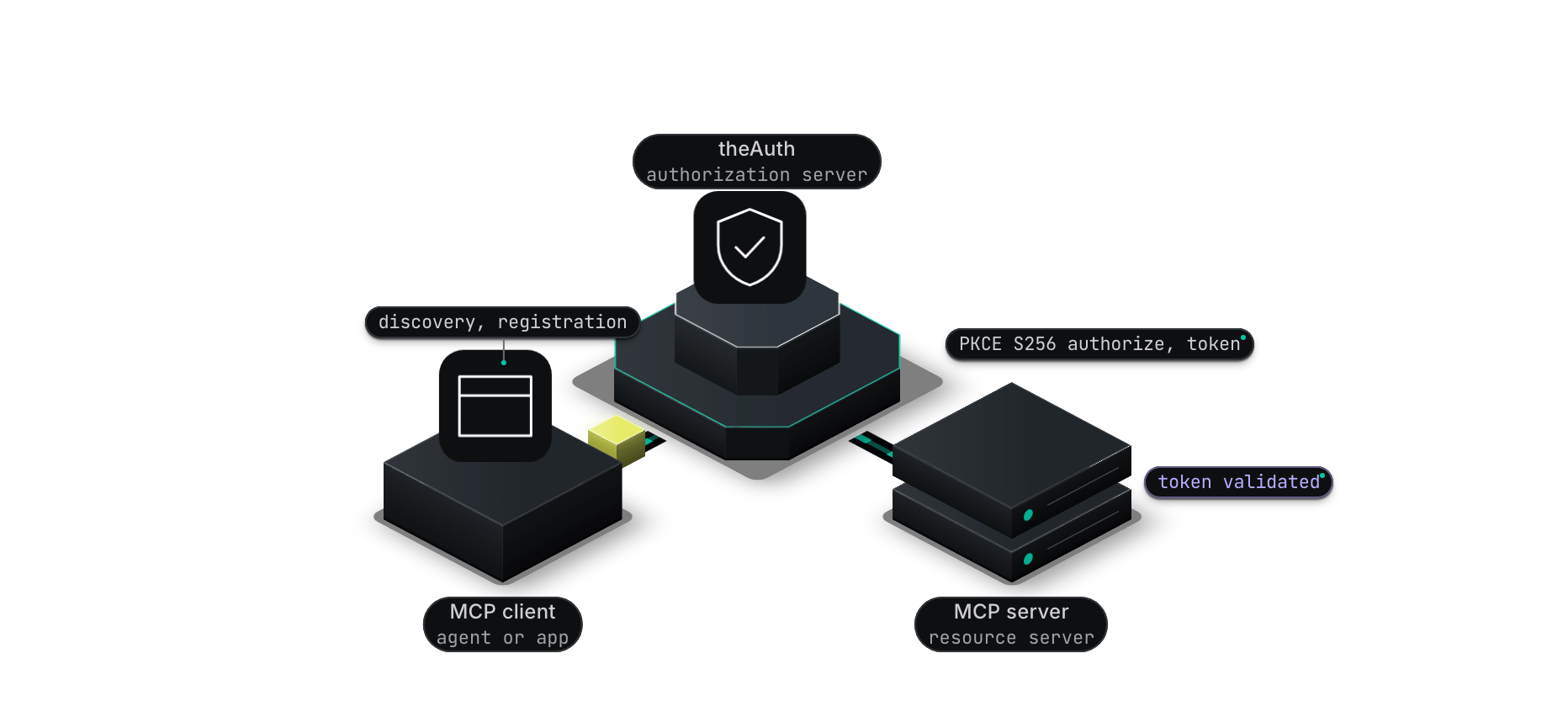 theAuth implements the full MCP auth stack:
* OAuth 2.1 with PKCE (S256 code challenge method only)
* Protected Resource Metadata (RFC 9728)
* Authorization Server Metadata (RFC 8414)
* Resource Indicators (RFC 8707)
* Dynamic Client Registration (RFC 7591)
This page describes the TypeScript package. The Go server in this repository exposes its OAuth endpoints under `/oauth/*` instead (`/oauth/authorize`, `/oauth/token`). The TypeScript adapters serve `/mcp/register`, `/mcp/authorize`, and `/mcp/token`, as listed below.
## Setup
The OAuth server is a separate module from the `theauth` instance. You create it with `createMcpModule` from `@glinr/theauth/mcp` and pass it to a framework adapter. The module has no built-in database: you supply the storage callbacks.
### Setting up
```typescript theme={"dark"}
import { createTheAuth } from '@glinr/theauth';
import { createMcpModule } from '@glinr/theauth/mcp';
import type { McpAccessToken, McpAuthorizationCode, McpClient } from '@glinr/theauth/mcp';
// In-memory stores for illustration. Back these with your database in production.
const clients = new Map();
const codes = new Map();
const tokens = new Map();
const byRefreshToken = new Map();
export const mcpStore = {
storeClient: async (client: McpClient) => {
clients.set(client.clientId, client);
},
findClient: async (clientId: string) => clients.get(clientId) ?? null,
storeAuthorizationCode: async (code: McpAuthorizationCode) => {
codes.set(code.code, code);
},
consumeAuthorizationCode: async (code: string) => {
const found = codes.get(code) ?? null;
if (found) codes.delete(code); // a code must be single use
return found;
},
storeToken: async (token: McpAccessToken) => {
tokens.set(token.accessToken, token);
if (token.refreshToken) byRefreshToken.set(token.refreshToken, token.accessToken);
},
findTokenByRefreshToken: async (refreshToken: string) => {
const accessToken = byRefreshToken.get(refreshToken);
return accessToken ? (tokens.get(accessToken) ?? null) : null;
},
revokeToken: async (accessToken: string) => {
tokens.delete(accessToken);
},
// Return the signed-in user's ID from your session, or null to send them to loginPage
resolveUserId: async (request: Request) => {
void request;
return null as string | null;
},
};
export const theauth = await createTheAuth({
database: { provider: 'sqlite', url: 'theauth.db' },
baseUrl: 'https://auth.yourapp.com',
mcp: { enabled: true }, // creates the MCP server registry table
});
export const mcp = createMcpModule({
config: {
enabled: true,
issuer: 'https://auth.yourapp.com',
// Public origin plus the path where you mount the adapter
baseUrl: 'https://auth.yourapp.com/api/theauth',
signingSecret: process.env.MCP_SIGNING_SECRET!, // at least 32 characters
scopes: ['mcp:read', 'mcp:execute'],
loginPage: 'https://auth.yourapp.com/login',
},
...mcpStore,
});
```
Then mount the module via a framework adapter by passing it as the `mcp` option, for example `theAuthHono(theauth, { mcp, authenticate })`. See [Framework adapters](/adapters).
`createTheAuth` accepts an `mcp` config key, but it only makes the instance create the MCP tables (including the registry behind `theauth.mcp.register`). It does not build the OAuth server, and `audience` is not an option. The OAuth server comes only from `createMcpModule`.
### MCP config options
These go in the `config` object passed to `createMcpModule`.
Required by the type. Set to `true`.
The authorization server URL. Appears in token claims and metadata documents. Required at runtime.
The URL under which the adapter serves the endpoints (origin plus mount path). The metadata documents are built from it, for example `${baseUrl}/mcp/token`. Required at runtime.
HMAC secret for access tokens, at least 32 characters. Required at runtime.
Extra scopes to advertise and accept, in addition to `openid`, `profile`, `email`, and `offline_access`.
Access token lifetime in seconds. Defaults to 3600.
Refresh token lifetime in seconds. Defaults to 604800 (7 days).
Authorization code lifetime in seconds. Defaults to 600.
Resource URIs (RFC 8707) that a client may request. A `resource` outside this list is rejected when the list is set.
Where users are sent when `resolveUserId` returns `null`.
When set, the authorize endpoint redirects here instead of issuing a code, and your page calls `mcp.approveConsent(...)` after the user allows.
Clients stored at startup through `storeClient`.
### Endpoints
Adapters register these routes relative to their mount path (default `/api/theauth`):
| Endpoint | RFC | Purpose |
| - | - | - |
| `GET /.well-known/oauth-authorization-server` | RFC 8414 | Authorization server metadata |
| `GET /.well-known/oauth-protected-resource` | RFC 9728 | Protected resource metadata |
| `POST /mcp/register` | RFC 7591 | Dynamic client registration |
| `GET /mcp/authorize` | OAuth 2.1 | Authorization endpoint |
| `POST /mcp/token` | OAuth 2.1 | Token endpoint |
So with the default mount, the token endpoint is `https://auth.yourapp.com/api/theauth/mcp/token`. The authorization server metadata also advertises `revocation_endpoint` (`/mcp/revoke`) and `jwks_uri` (`/mcp/jwks`), but the TypeScript adapters do not serve either route today.
The well-known documents are registered relative to the mount point, so with the default mount they live at `/api/theauth/.well-known/...`. MCP clients look for them at the root of your origin (`/.well-known/oauth-authorization-server` and `/.well-known/oauth-protected-resource`). When you mount the adapter under a prefix, add root-level routes (or rewrites) that serve the same documents:
```typescript theme={"dark"}
app.get('/.well-known/oauth-authorization-server', (c) => c.json(mcp.getMetadata()));
app.get('/.well-known/oauth-protected-resource', (c) => c.json(mcp.getProtectedResourceMetadata()));
```
## OAuth flow
### PKCE flow
theAuth only accepts `S256`. Plain PKCE is rejected at the authorization endpoint.
### Generate a code verifier
The client generates a cryptographically random string between 43 and 128 characters.
```typescript theme={"dark"}
const array = new Uint8Array(32);
crypto.getRandomValues(array);
const codeVerifier = btoa(String.fromCharCode(...array))
.replace(/\+/g, '-').replace(/\//g, '_').replace(/=+$/, '');
```
### Compute the code challenge
```typescript theme={"dark"}
const encoder = new TextEncoder();
const data = encoder.encode(codeVerifier);
const digest = await crypto.subtle.digest('SHA-256', data);
const codeChallenge = btoa(String.fromCharCode(...new Uint8Array(digest)))
.replace(/\+/g, '-').replace(/\//g, '_').replace(/=+$/, '');
```
### Redirect to the authorization endpoint
```typescript theme={"dark"}
const authUrl = new URL('https://auth.yourapp.com/api/theauth/mcp/authorize');
authUrl.searchParams.set('response_type', 'code');
authUrl.searchParams.set('client_id', clientId);
authUrl.searchParams.set('redirect_uri', redirectUri);
authUrl.searchParams.set('code_challenge', codeChallenge);
authUrl.searchParams.set('code_challenge_method', 'S256');
authUrl.searchParams.set('scope', 'mcp:read mcp:execute');
```
### Exchange the code for tokens
After the user approves, the server issues an authorization code. The client sends it to `/mcp/token` along with the original `code_verifier`.
The server computes `base64url(sha256(code_verifier))` and compares it to the stored challenge. A mismatch is rejected.
### Token format
Access tokens are JWTs signed with HS256 (`typ: at+jwt`). They carry:
* `sub`: the user ID of the person who authorized the client
* `client_id`: the OAuth client
* `aud`: the `resource` the client requested (RFC 8707), or the issuer when none was requested
* `scope`: space-separated granted scopes
* `jti`: unique token ID
* `exp` and `iat`: expiry and issued-at timestamps
A refresh token is issued only when the granted scope includes `offline_access`. Each refresh call revokes the old access token and issues a new access and refresh token pair. The module does not detect refresh token reuse: that depends on what your `findTokenByRefreshToken` and `revokeToken` callbacks do.
## Token validation
### Validating tokens
Call `mcp.validateToken(token, requiredScopes?)` on the module returned by `createMcpModule`. It returns a `Result`, not a flat object:
```typescript theme={"dark"}
const result = await mcp.validateToken(token, ['mcp:read']);
if (!result.success) {
// result.error.code: INVALID_TOKEN, TOKEN_EXPIRED, INVALID_AUDIENCE, INVALID_ISSUER, INSUFFICIENT_SCOPE, ...
return new Response('Unauthorized', { status: 401 });
}
const session = result.data;
// session.userId: the user who authorized the client
// session.clientId: the OAuth client
// session.scopes: granted scopes as a string array
// session.resource: the audience the token is bound to
// session.expiresAt: Date object
```
Validation checks the JWT signature (HS256), issuer, expiry, that an audience claim is present, and (when you pass `requiredScopes`) that every scope is on the token. It does not compare the audience with your resource URL unless you use the lower-level `validateAccessToken` with `expectedAudience`.
`theauth.mcp` on the main instance is only a registry of MCP tool servers (`register`, `list`, `get`). It has no `validate` method. Token validation lives on the module from `createMcpModule`.
### Protecting a route
`mcp.requireScopes(request, scopes)` extracts the bearer token, validates it, and either returns the session or a ready-made `Response`: 401 with a `WWW-Authenticate` header when the token is missing or invalid, and 403 with a step-up challenge when it lacks a required scope.
```typescript theme={"dark"}
// Hono example. See the adapters doc for other frameworks.
import { Hono } from 'hono';
import type { McpSession } from '@glinr/theauth/mcp';
import { theAuthHono } from '@glinr/theauth-hono';
import { theauth, mcp } from './lib/theauth.js';
const app = new Hono<{ Variables: { mcpSession: McpSession } }>();
app.route('/api/theauth', theAuthHono(theauth, { mcp, authenticate }));
app.use('/mcp/*', async (c, next) => {
const check = await mcp.requireScopes(c.req.raw, ['mcp:read']);
if (!check.authorized) return check.response;
c.set('mcpSession', check.session);
await next();
});
```
`mcp.middleware(request)` is the lighter variant: it returns the same `Result` as `validateToken` after reading the `Authorization` header. The adapters do not add a `withMcpAuth` helper to the app.
### Unauthorized responses
`buildUnauthorizedResponse` and `createMcpResponseHelpers` are exported from `@glinr/theauth/mcp`, but they take an internal context object that the module does not expose. For ordinary handlers, use `mcp.requireScopes` (which builds the 401 and 403 responses for you) or `mcp.buildStepUpResponse({ currentScopes, requiredScopes })`.
## Registering MCP servers
`theauth.mcp` stores a registry of the tool servers you operate. The registry is a database table (created when you pass `mcp` to `createTheAuth`):
```typescript theme={"dark"}
const server = await theauth.mcp.register({
name: 'github-mcp',
endpoint: 'https://mcp.yourapp.com/github',
tools: ['list_repos', 'get_issue', 'create_comment'],
authRequired: true,
rateLimit: { rpm: 60 },
});
// server.id is a generated ID
const all = await theauth.mcp.list();
const one = await theauth.mcp.get(server.id);
```
The registry is bookkeeping for your own tooling and dashboards. It is not read by the metadata documents or the OAuth endpoints. Tool names can still be used in permission resources, for example `mcp:github-mcp:list_repos`.
Generated from the module `config` (issuer, baseUrl, scopes), not from the registry:
```json theme={"dark"}
{
"resource": "https://auth.yourapp.com",
"authorization_servers": ["https://auth.yourapp.com"],
"jwks_uri": "https://auth.yourapp.com/api/theauth/mcp/jwks",
"scopes_supported": ["openid", "profile", "email", "offline_access", "mcp:read", "mcp:execute"],
"bearer_methods_supported": ["header"],
"resource_signing_alg_values_supported": ["HS256"]
}
```
```json theme={"dark"}
{
"issuer": "https://auth.yourapp.com",
"authorization_endpoint": "https://auth.yourapp.com/api/theauth/mcp/authorize",
"token_endpoint": "https://auth.yourapp.com/api/theauth/mcp/token",
"registration_endpoint": "https://auth.yourapp.com/api/theauth/mcp/register",
"jwks_uri": "https://auth.yourapp.com/api/theauth/mcp/jwks",
"revocation_endpoint": "https://auth.yourapp.com/api/theauth/mcp/revoke",
"scopes_supported": ["openid", "profile", "email", "offline_access", "mcp:read", "mcp:execute"],
"code_challenge_methods_supported": ["S256"],
"grant_types_supported": ["authorization_code", "refresh_token"],
"response_types_supported": ["code"],
"response_modes_supported": ["query"],
"token_endpoint_auth_methods_supported": ["client_secret_basic", "client_secret_post", "none"]
}
```
## Security hardening
These behaviors are on by default unless noted.
**Resource and audience are mandatory.** `resource` (RFC 8707) is required at the authorize and token endpoints, and access tokens are always bound to it. Resource servers must say which audience they accept: set `config.resource` (used by `middleware`, `validateToken` and `requireScopes`) or pass `expectedAudience` to `withMcpAuth` and `validateAccessToken`. Calls without one return a `SERVER_ERROR` that names the missing option.
```ts theme={"dark"}
import { withMcpAuth } from '@glinr/theauth/mcp';
const result = await withMcpAuth(ctx, request, {
expectedAudience: "https://mcp.example.com",
requiredScopes: ["mcp:read"],
});
```
**Hashed storage.** Client secrets are stored as `sha256:`, and `McpAccessToken.accessToken` and `refreshToken` hold SHA-256 digests, not raw values. Secrets are compared in constant time. Rows written by older versions still work: a legacy plaintext secret is accepted once and upgraded when you implement the optional `updateClientSecret(clientId, hash)` callback, and a raw refresh token is found by a second `findTokenByRefreshToken` call.
**Refresh rotation with reuse detection (RFC 9700).** Each refresh token belongs to a family. Replaying a rotated token revokes the whole family. By default families live in process memory; for more than one instance pass the database-backed store:
```ts theme={"dark"}
import { createMcpModule } from '@glinr/theauth/mcp';
import { createTokenFamilyStore } from '@glinr/theauth';
createMcpModule({
config: { /* ... */ tokenFamilies: createTokenFamilyStore(db), refreshTokenAbsoluteTtl: 2592000 },
revokeTokenFamily: async (familyId) => { /* delete stored tokens with this familyId */ },
// ...
});
```
On refresh, a `scope` that was not part of the original grant returns `invalid_scope`, and a `resource` that differs from the original grant returns `invalid_target`.
**Revocation and the jti denylist.** `mcp.revoke(request)` implements RFC 7009 (`POST /mcp/revoke`, client authenticated, own tokens only). Access tokens are JWTs, so revoking one only takes effect immediately if you set `config.jtiDenylist` (`createInMemoryJtiDenylist()` for a single process, or your own shared store). Without it a revoked access token stays valid until `exp`.
**Asymmetric signing (opt in).** HS256 with `signingSecret` stays the default. To publish keys and sign with ES256 or EdDSA:
```ts theme={"dark"}
import { createMcpModule, generateMcpSigningKey } from '@glinr/theauth/mcp';
const key = await generateMcpSigningKey("ES256", "2026-10");
const mcp = createMcpModule({
config: {
// ...
signing: { alg: "ES256", current: { kid: key.kid, privateKey: key.privateKey } },
},
// ...
});
app.get("/mcp/jwks", async () => mcp.getJwks());
```
To rotate, move the old key into `previous: [{ kid, publicKey }]` and set a new `current`. Both keys are published, tokens signed by either verify, and you drop the old entry once its tokens have expired. If `signingSecret` is still set, HS256 tokens keep verifying during the migration.
**Issuer identification (RFC 9207).** Authorization responses carry `iss`, and metadata sets `authorization_response_iss_parameter_supported`.
**Client ID Metadata Documents (opt in).** With `clientIdMetadataDocuments: { enabled: true }`, an unknown `https://` client\_id is fetched and its document must contain the same `client_id`. The fetcher resolves DNS and refuses loopback, private, link-local, CGNAT, unique-local and metadata addresses, never follows redirects, caps the body at 5 KB, accepts JSON only, times out after 5 seconds, and fails closed. It cannot pin the connection to the address it checked, so a hostile DNS server with a near-zero TTL can in theory still rebind; supply a `fetchImpl` that pins the IP if that matters for you. Registration no longer fetches `client_uri`.
## Related
Agent tokens that MCP clients receive after authorization.
Reverse proxy that enforces MCP token validation without code changes.
IETF draft claims emitted on MCP-issued agent JWTs.
Delegate a subset of MCP scopes to sub-agents with depth limits.
This documentation is built and hosted on [Mintlify](https://mintlify.com), a developer documentation platform.
theAuth implements the full MCP auth stack:
* OAuth 2.1 with PKCE (S256 code challenge method only)
* Protected Resource Metadata (RFC 9728)
* Authorization Server Metadata (RFC 8414)
* Resource Indicators (RFC 8707)
* Dynamic Client Registration (RFC 7591)
This page describes the TypeScript package. The Go server in this repository exposes its OAuth endpoints under `/oauth/*` instead (`/oauth/authorize`, `/oauth/token`). The TypeScript adapters serve `/mcp/register`, `/mcp/authorize`, and `/mcp/token`, as listed below.
## Setup
The OAuth server is a separate module from the `theauth` instance. You create it with `createMcpModule` from `@glinr/theauth/mcp` and pass it to a framework adapter. The module has no built-in database: you supply the storage callbacks.
### Setting up
```typescript theme={"dark"}
import { createTheAuth } from '@glinr/theauth';
import { createMcpModule } from '@glinr/theauth/mcp';
import type { McpAccessToken, McpAuthorizationCode, McpClient } from '@glinr/theauth/mcp';
// In-memory stores for illustration. Back these with your database in production.
const clients = new Map();
const codes = new Map();
const tokens = new Map();
const byRefreshToken = new Map();
export const mcpStore = {
storeClient: async (client: McpClient) => {
clients.set(client.clientId, client);
},
findClient: async (clientId: string) => clients.get(clientId) ?? null,
storeAuthorizationCode: async (code: McpAuthorizationCode) => {
codes.set(code.code, code);
},
consumeAuthorizationCode: async (code: string) => {
const found = codes.get(code) ?? null;
if (found) codes.delete(code); // a code must be single use
return found;
},
storeToken: async (token: McpAccessToken) => {
tokens.set(token.accessToken, token);
if (token.refreshToken) byRefreshToken.set(token.refreshToken, token.accessToken);
},
findTokenByRefreshToken: async (refreshToken: string) => {
const accessToken = byRefreshToken.get(refreshToken);
return accessToken ? (tokens.get(accessToken) ?? null) : null;
},
revokeToken: async (accessToken: string) => {
tokens.delete(accessToken);
},
// Return the signed-in user's ID from your session, or null to send them to loginPage
resolveUserId: async (request: Request) => {
void request;
return null as string | null;
},
};
export const theauth = await createTheAuth({
database: { provider: 'sqlite', url: 'theauth.db' },
baseUrl: 'https://auth.yourapp.com',
mcp: { enabled: true }, // creates the MCP server registry table
});
export const mcp = createMcpModule({
config: {
enabled: true,
issuer: 'https://auth.yourapp.com',
// Public origin plus the path where you mount the adapter
baseUrl: 'https://auth.yourapp.com/api/theauth',
signingSecret: process.env.MCP_SIGNING_SECRET!, // at least 32 characters
scopes: ['mcp:read', 'mcp:execute'],
loginPage: 'https://auth.yourapp.com/login',
},
...mcpStore,
});
```
Then mount the module via a framework adapter by passing it as the `mcp` option, for example `theAuthHono(theauth, { mcp, authenticate })`. See [Framework adapters](/adapters).
`createTheAuth` accepts an `mcp` config key, but it only makes the instance create the MCP tables (including the registry behind `theauth.mcp.register`). It does not build the OAuth server, and `audience` is not an option. The OAuth server comes only from `createMcpModule`.
### MCP config options
These go in the `config` object passed to `createMcpModule`.
Required by the type. Set to `true`.
The authorization server URL. Appears in token claims and metadata documents. Required at runtime.
The URL under which the adapter serves the endpoints (origin plus mount path). The metadata documents are built from it, for example `${baseUrl}/mcp/token`. Required at runtime.
HMAC secret for access tokens, at least 32 characters. Required at runtime.
Extra scopes to advertise and accept, in addition to `openid`, `profile`, `email`, and `offline_access`.
Access token lifetime in seconds. Defaults to 3600.
Refresh token lifetime in seconds. Defaults to 604800 (7 days).
Authorization code lifetime in seconds. Defaults to 600.
Resource URIs (RFC 8707) that a client may request. A `resource` outside this list is rejected when the list is set.
Where users are sent when `resolveUserId` returns `null`.
When set, the authorize endpoint redirects here instead of issuing a code, and your page calls `mcp.approveConsent(...)` after the user allows.
Clients stored at startup through `storeClient`.
### Endpoints
Adapters register these routes relative to their mount path (default `/api/theauth`):
| Endpoint | RFC | Purpose |
| - | - | - |
| `GET /.well-known/oauth-authorization-server` | RFC 8414 | Authorization server metadata |
| `GET /.well-known/oauth-protected-resource` | RFC 9728 | Protected resource metadata |
| `POST /mcp/register` | RFC 7591 | Dynamic client registration |
| `GET /mcp/authorize` | OAuth 2.1 | Authorization endpoint |
| `POST /mcp/token` | OAuth 2.1 | Token endpoint |
So with the default mount, the token endpoint is `https://auth.yourapp.com/api/theauth/mcp/token`. The authorization server metadata also advertises `revocation_endpoint` (`/mcp/revoke`) and `jwks_uri` (`/mcp/jwks`), but the TypeScript adapters do not serve either route today.
The well-known documents are registered relative to the mount point, so with the default mount they live at `/api/theauth/.well-known/...`. MCP clients look for them at the root of your origin (`/.well-known/oauth-authorization-server` and `/.well-known/oauth-protected-resource`). When you mount the adapter under a prefix, add root-level routes (or rewrites) that serve the same documents:
```typescript theme={"dark"}
app.get('/.well-known/oauth-authorization-server', (c) => c.json(mcp.getMetadata()));
app.get('/.well-known/oauth-protected-resource', (c) => c.json(mcp.getProtectedResourceMetadata()));
```
## OAuth flow
### PKCE flow
theAuth only accepts `S256`. Plain PKCE is rejected at the authorization endpoint.
### Generate a code verifier
The client generates a cryptographically random string between 43 and 128 characters.
```typescript theme={"dark"}
const array = new Uint8Array(32);
crypto.getRandomValues(array);
const codeVerifier = btoa(String.fromCharCode(...array))
.replace(/\+/g, '-').replace(/\//g, '_').replace(/=+$/, '');
```
### Compute the code challenge
```typescript theme={"dark"}
const encoder = new TextEncoder();
const data = encoder.encode(codeVerifier);
const digest = await crypto.subtle.digest('SHA-256', data);
const codeChallenge = btoa(String.fromCharCode(...new Uint8Array(digest)))
.replace(/\+/g, '-').replace(/\//g, '_').replace(/=+$/, '');
```
### Redirect to the authorization endpoint
```typescript theme={"dark"}
const authUrl = new URL('https://auth.yourapp.com/api/theauth/mcp/authorize');
authUrl.searchParams.set('response_type', 'code');
authUrl.searchParams.set('client_id', clientId);
authUrl.searchParams.set('redirect_uri', redirectUri);
authUrl.searchParams.set('code_challenge', codeChallenge);
authUrl.searchParams.set('code_challenge_method', 'S256');
authUrl.searchParams.set('scope', 'mcp:read mcp:execute');
```
### Exchange the code for tokens
After the user approves, the server issues an authorization code. The client sends it to `/mcp/token` along with the original `code_verifier`.
The server computes `base64url(sha256(code_verifier))` and compares it to the stored challenge. A mismatch is rejected.
### Token format
Access tokens are JWTs signed with HS256 (`typ: at+jwt`). They carry:
* `sub`: the user ID of the person who authorized the client
* `client_id`: the OAuth client
* `aud`: the `resource` the client requested (RFC 8707), or the issuer when none was requested
* `scope`: space-separated granted scopes
* `jti`: unique token ID
* `exp` and `iat`: expiry and issued-at timestamps
A refresh token is issued only when the granted scope includes `offline_access`. Each refresh call revokes the old access token and issues a new access and refresh token pair. The module does not detect refresh token reuse: that depends on what your `findTokenByRefreshToken` and `revokeToken` callbacks do.
## Token validation
### Validating tokens
Call `mcp.validateToken(token, requiredScopes?)` on the module returned by `createMcpModule`. It returns a `Result`, not a flat object:
```typescript theme={"dark"}
const result = await mcp.validateToken(token, ['mcp:read']);
if (!result.success) {
// result.error.code: INVALID_TOKEN, TOKEN_EXPIRED, INVALID_AUDIENCE, INVALID_ISSUER, INSUFFICIENT_SCOPE, ...
return new Response('Unauthorized', { status: 401 });
}
const session = result.data;
// session.userId: the user who authorized the client
// session.clientId: the OAuth client
// session.scopes: granted scopes as a string array
// session.resource: the audience the token is bound to
// session.expiresAt: Date object
```
Validation checks the JWT signature (HS256), issuer, expiry, that an audience claim is present, and (when you pass `requiredScopes`) that every scope is on the token. It does not compare the audience with your resource URL unless you use the lower-level `validateAccessToken` with `expectedAudience`.
`theauth.mcp` on the main instance is only a registry of MCP tool servers (`register`, `list`, `get`). It has no `validate` method. Token validation lives on the module from `createMcpModule`.
### Protecting a route
`mcp.requireScopes(request, scopes)` extracts the bearer token, validates it, and either returns the session or a ready-made `Response`: 401 with a `WWW-Authenticate` header when the token is missing or invalid, and 403 with a step-up challenge when it lacks a required scope.
```typescript theme={"dark"}
// Hono example. See the adapters doc for other frameworks.
import { Hono } from 'hono';
import type { McpSession } from '@glinr/theauth/mcp';
import { theAuthHono } from '@glinr/theauth-hono';
import { theauth, mcp } from './lib/theauth.js';
const app = new Hono<{ Variables: { mcpSession: McpSession } }>();
app.route('/api/theauth', theAuthHono(theauth, { mcp, authenticate }));
app.use('/mcp/*', async (c, next) => {
const check = await mcp.requireScopes(c.req.raw, ['mcp:read']);
if (!check.authorized) return check.response;
c.set('mcpSession', check.session);
await next();
});
```
`mcp.middleware(request)` is the lighter variant: it returns the same `Result` as `validateToken` after reading the `Authorization` header. The adapters do not add a `withMcpAuth` helper to the app.
### Unauthorized responses
`buildUnauthorizedResponse` and `createMcpResponseHelpers` are exported from `@glinr/theauth/mcp`, but they take an internal context object that the module does not expose. For ordinary handlers, use `mcp.requireScopes` (which builds the 401 and 403 responses for you) or `mcp.buildStepUpResponse({ currentScopes, requiredScopes })`.
## Registering MCP servers
`theauth.mcp` stores a registry of the tool servers you operate. The registry is a database table (created when you pass `mcp` to `createTheAuth`):
```typescript theme={"dark"}
const server = await theauth.mcp.register({
name: 'github-mcp',
endpoint: 'https://mcp.yourapp.com/github',
tools: ['list_repos', 'get_issue', 'create_comment'],
authRequired: true,
rateLimit: { rpm: 60 },
});
// server.id is a generated ID
const all = await theauth.mcp.list();
const one = await theauth.mcp.get(server.id);
```
The registry is bookkeeping for your own tooling and dashboards. It is not read by the metadata documents or the OAuth endpoints. Tool names can still be used in permission resources, for example `mcp:github-mcp:list_repos`.
Generated from the module `config` (issuer, baseUrl, scopes), not from the registry:
```json theme={"dark"}
{
"resource": "https://auth.yourapp.com",
"authorization_servers": ["https://auth.yourapp.com"],
"jwks_uri": "https://auth.yourapp.com/api/theauth/mcp/jwks",
"scopes_supported": ["openid", "profile", "email", "offline_access", "mcp:read", "mcp:execute"],
"bearer_methods_supported": ["header"],
"resource_signing_alg_values_supported": ["HS256"]
}
```
```json theme={"dark"}
{
"issuer": "https://auth.yourapp.com",
"authorization_endpoint": "https://auth.yourapp.com/api/theauth/mcp/authorize",
"token_endpoint": "https://auth.yourapp.com/api/theauth/mcp/token",
"registration_endpoint": "https://auth.yourapp.com/api/theauth/mcp/register",
"jwks_uri": "https://auth.yourapp.com/api/theauth/mcp/jwks",
"revocation_endpoint": "https://auth.yourapp.com/api/theauth/mcp/revoke",
"scopes_supported": ["openid", "profile", "email", "offline_access", "mcp:read", "mcp:execute"],
"code_challenge_methods_supported": ["S256"],
"grant_types_supported": ["authorization_code", "refresh_token"],
"response_types_supported": ["code"],
"response_modes_supported": ["query"],
"token_endpoint_auth_methods_supported": ["client_secret_basic", "client_secret_post", "none"]
}
```
## Security hardening
These behaviors are on by default unless noted.
**Resource and audience are mandatory.** `resource` (RFC 8707) is required at the authorize and token endpoints, and access tokens are always bound to it. Resource servers must say which audience they accept: set `config.resource` (used by `middleware`, `validateToken` and `requireScopes`) or pass `expectedAudience` to `withMcpAuth` and `validateAccessToken`. Calls without one return a `SERVER_ERROR` that names the missing option.
```ts theme={"dark"}
import { withMcpAuth } from '@glinr/theauth/mcp';
const result = await withMcpAuth(ctx, request, {
expectedAudience: "https://mcp.example.com",
requiredScopes: ["mcp:read"],
});
```
**Hashed storage.** Client secrets are stored as `sha256:`, and `McpAccessToken.accessToken` and `refreshToken` hold SHA-256 digests, not raw values. Secrets are compared in constant time. Rows written by older versions still work: a legacy plaintext secret is accepted once and upgraded when you implement the optional `updateClientSecret(clientId, hash)` callback, and a raw refresh token is found by a second `findTokenByRefreshToken` call.
**Refresh rotation with reuse detection (RFC 9700).** Each refresh token belongs to a family. Replaying a rotated token revokes the whole family. By default families live in process memory; for more than one instance pass the database-backed store:
```ts theme={"dark"}
import { createMcpModule } from '@glinr/theauth/mcp';
import { createTokenFamilyStore } from '@glinr/theauth';
createMcpModule({
config: { /* ... */ tokenFamilies: createTokenFamilyStore(db), refreshTokenAbsoluteTtl: 2592000 },
revokeTokenFamily: async (familyId) => { /* delete stored tokens with this familyId */ },
// ...
});
```
On refresh, a `scope` that was not part of the original grant returns `invalid_scope`, and a `resource` that differs from the original grant returns `invalid_target`.
**Revocation and the jti denylist.** `mcp.revoke(request)` implements RFC 7009 (`POST /mcp/revoke`, client authenticated, own tokens only). Access tokens are JWTs, so revoking one only takes effect immediately if you set `config.jtiDenylist` (`createInMemoryJtiDenylist()` for a single process, or your own shared store). Without it a revoked access token stays valid until `exp`.
**Asymmetric signing (opt in).** HS256 with `signingSecret` stays the default. To publish keys and sign with ES256 or EdDSA:
```ts theme={"dark"}
import { createMcpModule, generateMcpSigningKey } from '@glinr/theauth/mcp';
const key = await generateMcpSigningKey("ES256", "2026-10");
const mcp = createMcpModule({
config: {
// ...
signing: { alg: "ES256", current: { kid: key.kid, privateKey: key.privateKey } },
},
// ...
});
app.get("/mcp/jwks", async () => mcp.getJwks());
```
To rotate, move the old key into `previous: [{ kid, publicKey }]` and set a new `current`. Both keys are published, tokens signed by either verify, and you drop the old entry once its tokens have expired. If `signingSecret` is still set, HS256 tokens keep verifying during the migration.
**Issuer identification (RFC 9207).** Authorization responses carry `iss`, and metadata sets `authorization_response_iss_parameter_supported`.
**Client ID Metadata Documents (opt in).** With `clientIdMetadataDocuments: { enabled: true }`, an unknown `https://` client\_id is fetched and its document must contain the same `client_id`. The fetcher resolves DNS and refuses loopback, private, link-local, CGNAT, unique-local and metadata addresses, never follows redirects, caps the body at 5 KB, accepts JSON only, times out after 5 seconds, and fails closed. It cannot pin the connection to the address it checked, so a hostile DNS server with a near-zero TTL can in theory still rebind; supply a `fetchImpl` that pins the IP if that matters for you. Registration no longer fetches `client_uri`.
## Related
Agent tokens that MCP clients receive after authorization.
Reverse proxy that enforces MCP token validation without code changes.
IETF draft claims emitted on MCP-issued agent JWTs.
Delegate a subset of MCP scopes to sub-agents with depth limits.
This documentation is built and hosted on [Mintlify](https://mintlify.com), a developer documentation platform.