

oauth() plugin adds social sign-in to theAuth using the OAuth 2.0 authorization code flow with PKCE (S256). It handles the token exchange, account linking, and session creation.
oauth() issues a session on a successful callback, so auth.session must be configured in createTheAuth. Without it the plugin throws on startup.Built-in providers
Each provider is a factory exported from@glinr/theauth/auth. Pass the resulting instances to oauth() as a map keyed by provider ID.
GitHub
Apple
Discord
Slack
Microsoft
GitLab
createXProvider({ clientId, clientSecret, scopes?, redirectUri? })) exist for Atlassian, Dropbox, Figma, Notion, Reddit, Spotify, Twitch, Twitter / X, and Zoom. Additional services (Facebook, Bitbucket, Yahoo, LINE, Coinbase, and others) have preset helpers such as facebookProvider(clientId, clientSecret, scopes?), and Auth0, Okta, and Cognito take the tenant domain first: auth0Provider(domain, clientId, clientSecret, scopes?). See the individual provider pages.
Generic setup
lib/theauth.ts
providers is a Record<string, OAuthProvider>. The key is the provider ID used in the URLs below. The session secret must be at least 32 characters.
The callback URL you register with each provider is:
baseUrl is the public URL where theAuth is served. When you mount theAuth under an adapter prefix such as /api/theauth, include the prefix in baseUrl (for example https://your-app.com/api/theauth), so the URL registered with the provider is https://your-app.com/api/theauth/auth/oauth/callback/google. To compute a different redirect URI, pass buildRedirectUri: (provider, baseUrl) => string to oauth(). A provider can also carry its own redirectUri override.
Endpoints
The plugin registers these routes (relative to the adapter prefix):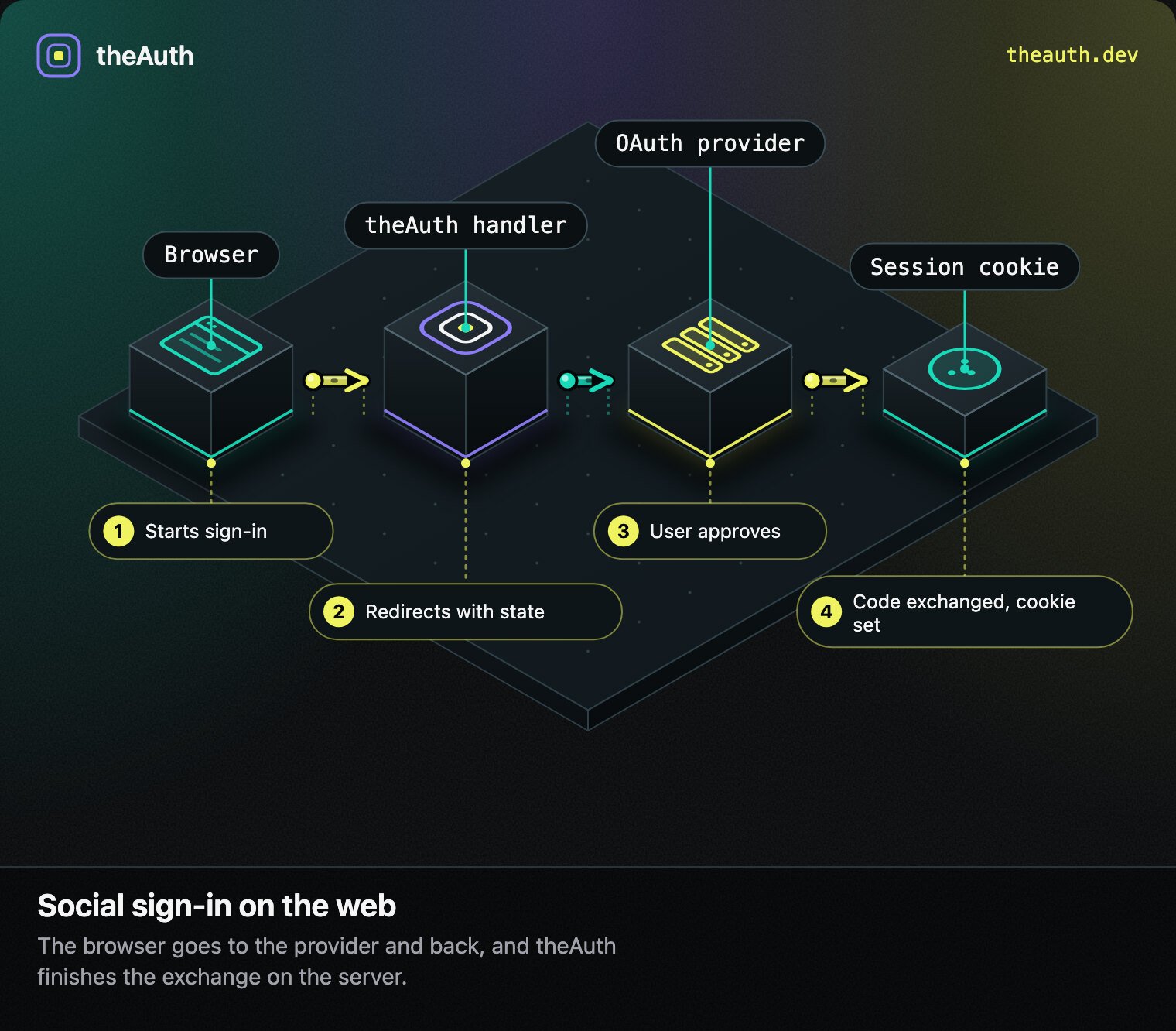
Web sign-in: redirect out, code back, session cookie set.
The sign-in flow
- Your frontend navigates to
/auth/oauth/authorize/{provider}. theAuth generates a random state and a PKCE verifier, stores both in the database (default lifetime 10 minutes, set withstateTtlSeconds), and redirects to the provider with the S256 challenge. - The provider redirects back to
/auth/oauth/callback/{provider}with an authorization code and the state. - theAuth validates and consumes the state, exchanges the code for tokens, and fetches the user profile.
- theAuth finds the user by email or creates one and links the provider account. It then asks the sign-in gate whether a session may be issued. If so it sets the
theauth_sessioncookie and redirects to{baseUrl}/?auth_user=<url-encoded JSON with id and email>. If the user must change their password or pass a second factor, it redirects to{baseUrl}/with the challenge in the URL fragment and sets no cookie.
Every first-class provider sends the PKCE challenge except Notion, which does not support PKCE. GitHub accepts the parameter and ignores it.
Account linking
When the email returned by the provider matches an existing user, theAuth links the provider account to that user only if the provider says the address is verified and the existing user’s address is verified too. If either side is unverified, the callback answers 409 and links nothing: the user signs in with their existing method and links the provider from account settings. This stops account pre-hijacking, where someone registers a victim’s address first and keeps access after the victim signs in with a provider. Otherwise it creates a new user, with the email marked verified only when the provider vouched for it. Providers that do not report verification (Microsoft, Linear, Cloudflare, PayPal, Kick, Spotify and Apple) never link by email. A user can have several linked providers. Only the email and name are copied onto the user record; the avatar is not stored. Apps that need the old behavior can setunsafeAllowUnverifiedEmailLinking: true on oauth(). It links by email whatever either side says, so only use it when every sign-up path of your app verifies addresses first.
If a provider returns no email (Reddit, for example), the callback cannot match or create a user. The account row stays unassigned and the callback responds with JSON (isNewAccount, account, userInfo) instead of a session.
The plugin adds GET /auth/oauth/accounts and DELETE /auth/oauth/accounts/:provider, and exposes the OAuth module as theauth.plugins.getContext().oauth. From it you get getAccessToken (with refresh), listAccounts and unlinkAccount. See Social token API. To work with the module without the plugin, build it with createOAuthModule(db, { providers }).
Custom providers
Any OIDC-compliant provider works with the generic factorygenericOIDC. Supply an issuer to use discovery, or supply explicit endpoints to skip it:
genericOIDC reads sub, email, name, and picture from the userinfo response and fails if sub or email is missing. For a provider whose profile endpoint does not return those claims, implement the OAuthProvider interface yourself (getAuthorizationUrl, exchangeCode, and getUserInfo, which returns { id, email, name?, avatar?, raw }) and put the instance in providers.
Related
Sign in with Google using OIDC, the most common provider.
GitHub
OAuth 2.0 for GitHub with optional org and email scopes.
Authentication overview
All sign-in methods available in theAuth.
OIDC provider
Turn theAuth itself into an OpenID Connect identity provider.
Native app sign-in
Setmobile.redirectUris to let a native app finish the flow in the system browser (RFC 8252 with PKCE):
mobile_redirect must match an entry in redirectUris exactly, and the challenge is required. A wrong verifier burns the code. Failures are returned to the app as ?error=, and a required second factor arrives as the usual #gate=... fragment on the app URI. The code is stored in theauth_one_time_tokens, which createTheAuth now creates whenever the oauth plugin is registered. The Expo guide shows the client side.